
ES作为最强大的全文检索工具(没有之一),中英文分词几乎是必备功能,下面简单说明下分词器安装步骤(详细步骤网上很多,本文只提供整体思路和步骤):
- 下载拼音分词器
拼音分词器:https://github.com/medcl/elasticsearch-analysis-pinyin
- 安装
wget https://github.com/medcl/elasticsearch-analysis-pinyin/releases/download/v7.13.1/elasticsearch-analysis-pinyin-7.13.1.zip (下载对应版本)。
docker cp elasticsearch-analysis-pinyin-7.13.1.zip elasticsearch:/usr/share/elasticsearch/plugins
进入elasticsearch安装目录/plugins;mkdir pinyin;cd pinyin;
docker exec -it elasticsearch bash
cd /usr/share/elasticsearch/plugins
unzip elasticsearch-analysis-pinyin-7.13.1.zip -d pinyin
rm elasticsearch-analysis-pinyin-7.13.1.zip
部署后,记得重启es节点
3. 验证
POST _analyze
{
“analyzer”: “pinyin”,
“text”: “美国人”
}
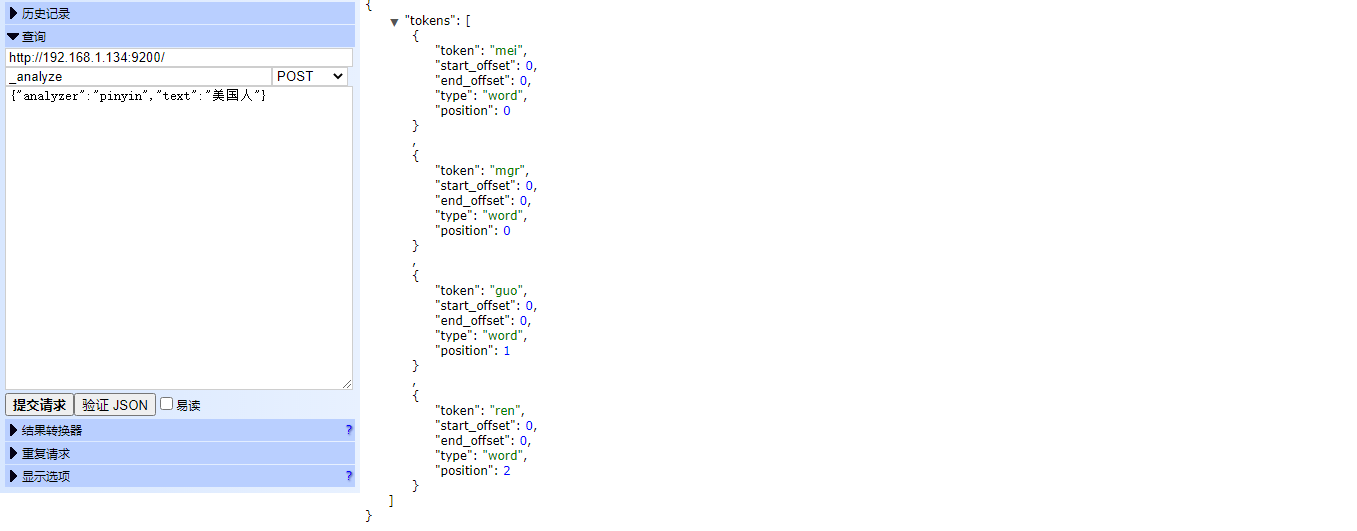
- 测试
通过_analyze测试下分词器是否能正常运行:
GET my_index/_analyze
{
“text”:[“刘德华”],
“analyzer”:”pinyin”
}
向index中put中文数据:
POST my_index/index_type -d’
{
“name”:”刘德华”
}
‘
中文分词测试(通过查询字符串)
curl http://localhost:9200/my_index/index_type/_search?q=name:刘
curl http://localhost:9200/my_index/index_type/_search?q=name:刘德
拼音测试 (通过查询字符串)
curl http://localhost:9200/my_index/index_type/_search?q=name.pinyin:liu
curl http://localhost:9200/my_index/index_type/_search?q=name.pinyin:ldh
curl http://localhost:9200/my_index/index_type/_search?q=name.pinyin:de+hua